Measure Soil Moisture(YL-69 or HL-69) Using Arduino
Have you ever wondered how thirst affects plants? What if their silent crying could be heard by your Arduino? You can now use your Arduino to determine if the soil is either moist or dry thanks to a soil moisture sensor. Isn't that thrilling? Pure, sensor-driven plant maintenance no more assumption! Are you ready to help your plants keep hydrated? Imagine if your Arduino is a plant's personal helper, always checking the moisture content of the soil. When the plants are too dry, it may send out a signal to water them! No more watering too much or too little! Are you prepared to create this innovative, environmentally friendly hydration system with your Arduino? Now let's begin.
An overview of Soil Moisture Sensor
A Soil Moisture The sensor measures the amount of water in the soil, which aids in the monitoring of plant health. It is made up of two probes that measure the electrical resistance between them; dry soil has a high resistance, while moist soil has a low resistance. The sensor provides this information to a microcontroller (such as Arduino), which then performs operations like watering the plant. It is essential for automated irrigation systems, which ensure plants receive the proper amount of water, minimize overwatering or underwatering, and promote healthy plant growth.

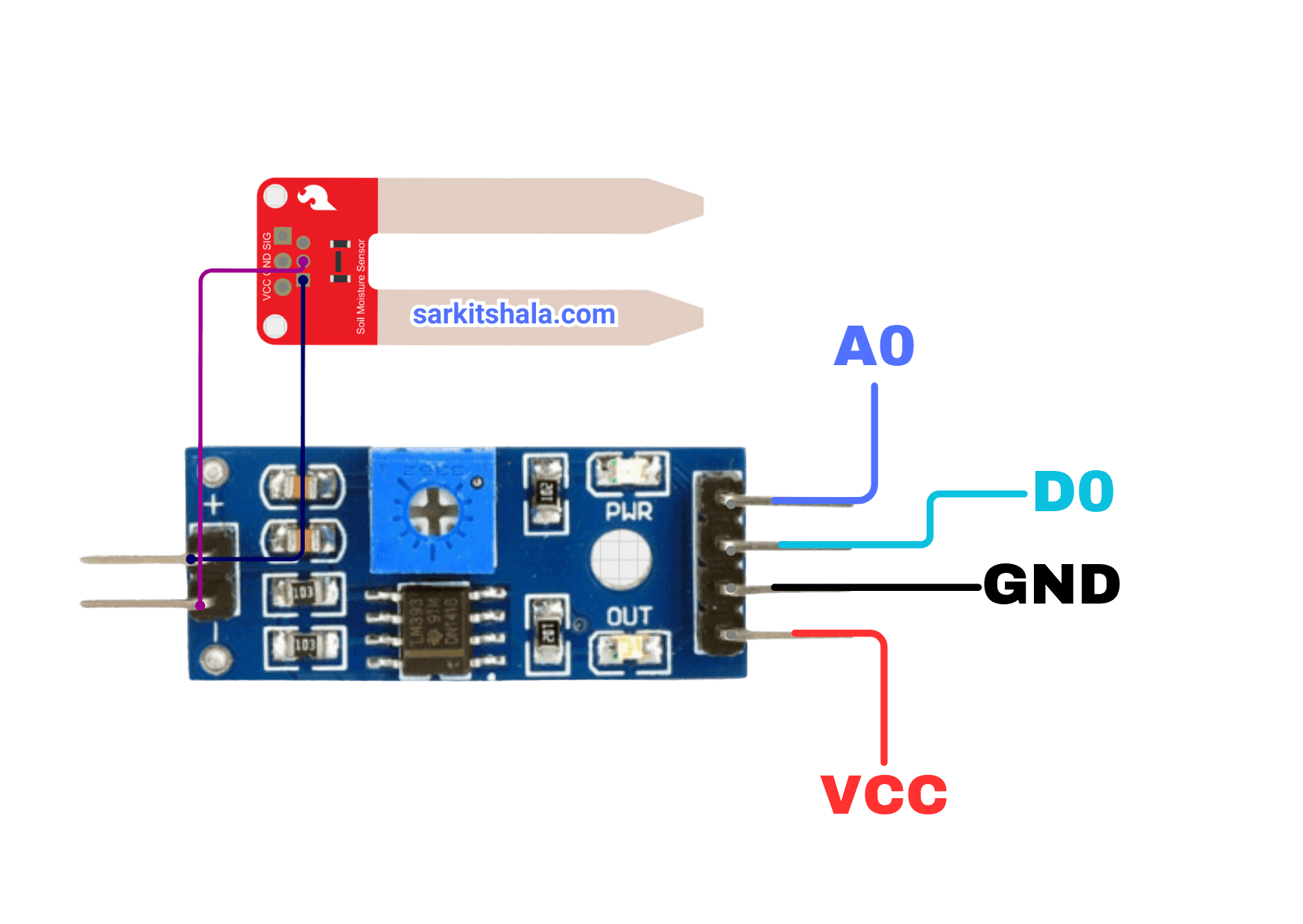
Pin Diagram
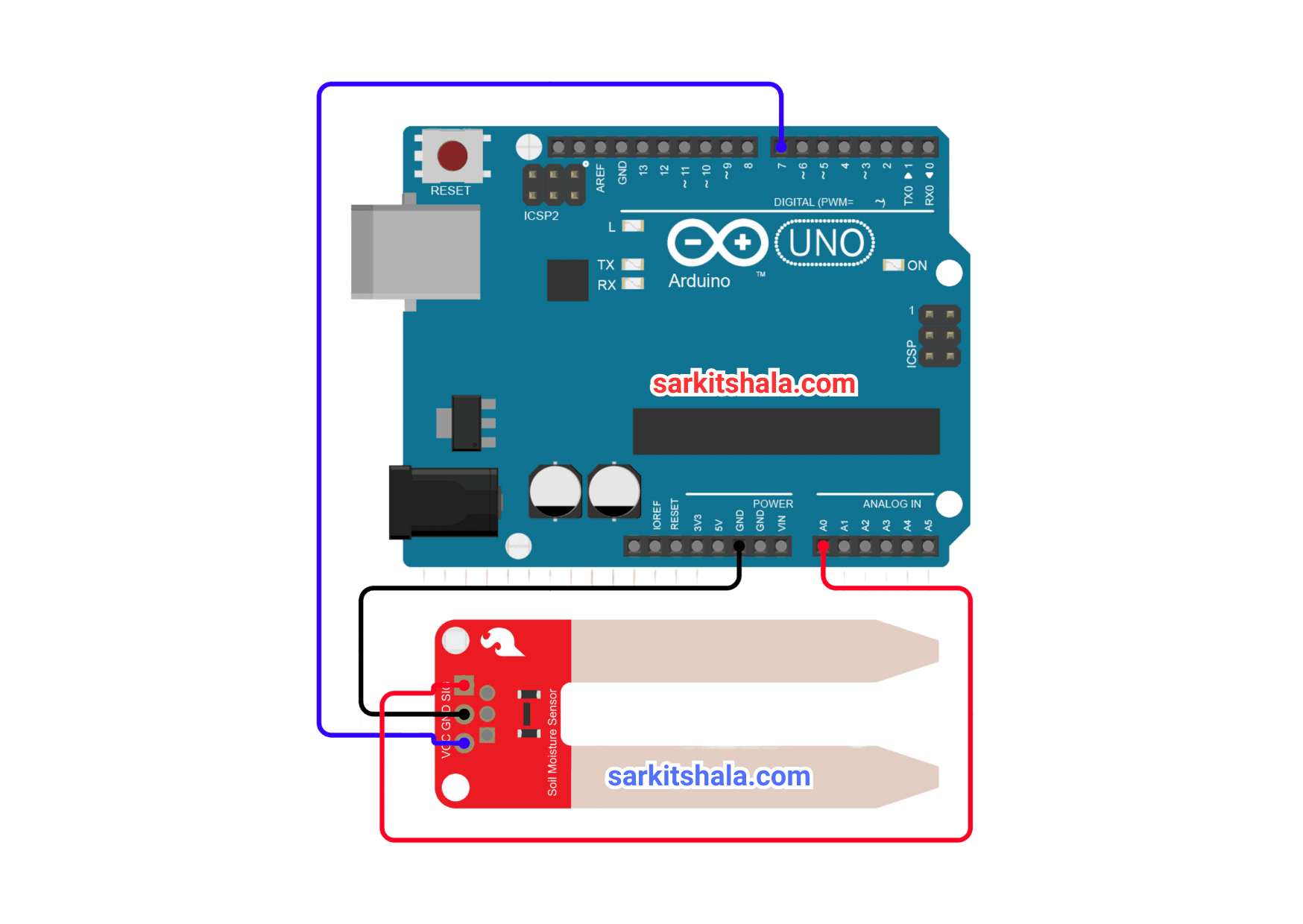
Circuit Diagram
Steps
1. Connect the Arduino's 5V pin to the soil moisture sensor's VCC pin, then ground the GND pin. Connect the Arduino's 5V pin to the soil moisture sensor's VCC pin, then ground the GND pin.
2. Connect the sensor's signal pin to an analog input pin on the Arduino, such as A0. Connect the sensor's signal pin to an analog input pin on the Arduino, such as A0.
3. Use an external power source or a USB cord to turn on the Arduino.
4. To read sensor values and utilize them to initiate actions, such as turning on a pump, write a simple piece of code. To read sensor values and utilize them to initiate actions, such as turning on a pump, write a simple piece of code.
Code
1
2 int sensor_pin=13;
3int sensor_state=1;
4void setup()
5{
6
7        pinMode(13,INPUT);
8        Serial.begin(9600);
9
10}
11void loop()
12{
13         Serial.print("Soil Moisture Level: ");
14         sensor_state = digitalRead(sensor_pin);
15         if (sensor_state == 1)
16         {
17            Serial.println("Wet");
18          }
19         else
20         {
21            Serial.println("Dry");
22           }
23          delay(200);
24}
25
Conclusion
Finally, it's like giving your plants a voice when you attach a soil moisture sensor to your Arduino! Without having to guess, you can now tell when they're thirsty. It's a clever, easy solution whether you're testing moisture levels or automating watering systems. Don't worry the next time your plants appear a bit too parched—your Arduino has you covered! Let your green pals enjoy the greatest hydration service ever while you relax. Finally, it's like giving your plants a voice when you attach a soil moisture sensor to your Arduino! Without having to guess, you can now tell when they're thirsty. It's a clever, easy solution whether you're testing moisture levels or automating watering systems. Don't worry the next time your plants appear a bit too parched—your Arduino has you covered! Let your green pals enjoy the greatest hydration service ever while you relax.